Each button sets the generator on this page to a KDP trim size with 30 designs in all five styles and a blank page behind each one (60 PDF pages), then takes you to Download coloring book. Change the style, Detail, design number or page count before you download.
KDP prints paperbacks at a fixed trim size. With bleed, the PDF page must be 0.125 in wider and 0.25 in taller than the trim, because the extra is cut off at the outside edge, the top and the bottom. huepad writes these exact sizes into the PDF and keeps every drawing inside KDP's margins.
Trim size
PDF page, no bleed
PDF page, with bleed
Drawings stay inside
8.5 × 11 in (US Letter)
8.5 × 11 in · 612 × 792 pt · 2550 × 3300 px
8.625 × 11.25 in · 621 × 810 pt · 2588 × 3375 px
0.49 in from every page edge without bleed; 0.5 in with bleed
8 × 10 in
8 × 10 in · 576 × 720 pt · 2400 × 3000 px
8.125 × 10.25 in · 585 × 738 pt · 2438 × 3075 px
0.47 in from every page edge without bleed; 0.5 in with bleed
KDP's minimum margins: outside margins (top, bottom, outer edge) at least 0.25 in without bleed and 0.375 in with bleed; the inside (gutter) margin at least 0.375 in for 24 to 150 pages and 0.5 in for 151 to 300 pages. With bleed, 0.5 in from the page edge is 0.375 in from the trimmed edge, so pages from huepad meet the outside minimum with bleed and the gutter minimum up to 300 pages; without bleed they meet both up to 150 pages, which covers the largest book huepad makes (50 designs with blank backs, 100 pages). Pixel sizes are at 300 DPI; a half pixel is rounded up, while the PDF page is exact in points.
Source: Amazon KDP Help, Set Trim Size, Bleed, and Margins, read 27 October 2026. KDP can change its rules; check the page before you publish.
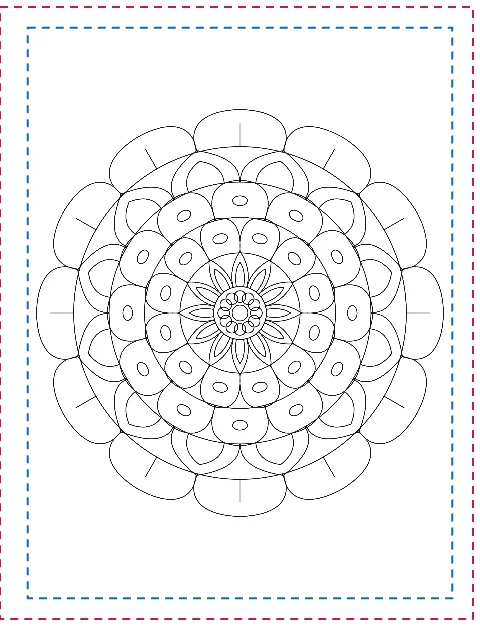
8.5 × 11 in with bleed. Pink: where KDP trims (0.125 in off the outer edge, top and bottom). Blue: drawings stay 0.5 in inside the page.Blank back pages. Every design is followed by an empty page, so each coloring page is on its own sheet, as in most coloring books.
Three choices before you download
Bleed or no bleed
Coloring pages from huepad have white margins, so they do not need bleed. Choose bleed only to match a book that has it, for example if you add full-page art made elsewhere. When you upload, pick the same bleed setting in KDP as in the PDF.
One-sided pages
Markers soak through paper, and a design on the back of another is ruined when its front is colored. Blank back pages put an empty page after every design. A book starts on a right-hand page, so the designs land on the right and the blanks on the left, as in the picture above.
How many pages
KDP paperbacks need at least 24 pages. With blank backs each design takes two, so 12 designs is the minimum and 30 to 50 designs (60 to 100 pages) is a common coloring book. huepad counts the PDF pages for you under the book settings.
From settings to upload
Pick a style and a first design number in the generator above, or All five styles for variety. Detail 4 to 6 suits adults and older children; 2 to 3 makes big spaces for young children.
Under Page & line settings, choose 8.5 × 11 in or 8 × 10 in, portrait, and turn on KDP bleed only if your book uses bleed.
Under Coloring book PDF, choose the number of coloring pages, tick Blank back pages and press Download coloring book. The pages are vector lines, so the file stays small and prints sharp.
Add your own front matter. huepad makes the coloring pages only. Put a title page and a copyright page in front with any PDF tool, keeping the same page size.
Upload the interior to KDP with the matching trim size and bleed setting, then check every page in KDP's previewer before you publish.
Using the pages commercially
Pages you make here are free for personal and commercial use, including books you sell on Amazon KDP, and no credit is needed. Designs are not exclusive: anyone who enters the same style, settings and design number gets the same page, so another seller could publish the same designs. To make your book your own, mix styles, choose your own design numbers, add captions, and combine the pages with your own work. For photo pages, use photos you have the right to use.
No. Covers have their own size, which depends on the page count and paper; make the cover with KDP's cover tools or another program.
Can I put photo pages in the book?
Not in the coloring book PDF, which holds pattern pages. Download each photo page as a PDF at the same paper and bleed setting, and add it to the book file with a PDF tool.
Why are the pixel sizes not exactly 300 DPI with bleed?
8.625 in at 300 DPI is 2587.5 pixels, so the image is 2588 pixels wide. Pattern pages in the PDF are vector lines and have no pixels at all; the PDF page size is exact.
Can I make the same book again later?
Yes. Note the style, the settings and the first design number, or copy a link to the design; the same settings always draw the same pages.